
NetSuite Plaid Integration – Enhancing Financial Efficiency
Simplify your financial transactions with NetSuite and Plaid Integration.
Auto import bank transactions, reduce manual data entry and receive real-time bank balances and cash flows straight from NetSuite.

What is NetSuite Plaid Integration?
NetSuite Plaid Integration establishes a direct connection between your financial institutions and Oracle NetSuite through Plaid's secure API. This integration facilitates the real-time synchronization of bank transactions, account balances, and account details, reducing the need for manual input and speeding up reconciliation processes within the NetSuite platform.
Key Features of NetSuite Plaid Integration
Automatic Bank Transaction Import
Use Plaid's/transactions/get API to import data from 12,000+ financial institutions—no manual data entry.
Real-Time Bank Balances
Follow daily cash position with daily bank balance updates and make better informed business decisions using the cash position analysis tool.
Auto-Reconciliation Tools
Automatically reconcile bank transactions to NetSuite GL records—reducing time to reconcile by up to 80%.
Secure & Scalable Architecture
100% built-in NetSuite SuiteScript 2.1 – no middleware, 3rd party platforms or external servers.
Native NetSuite Deployment
NetSuite Plaid Integration runs all its processes within NetSuite, leveraging Suitelets, RESTlets, and Map/Reduce developing techniques.
OAuth & TBA Authentication
Supported OAuth and Token Based Authentication for security and compliance.
How Does NetSuite Plaid Integration Work?
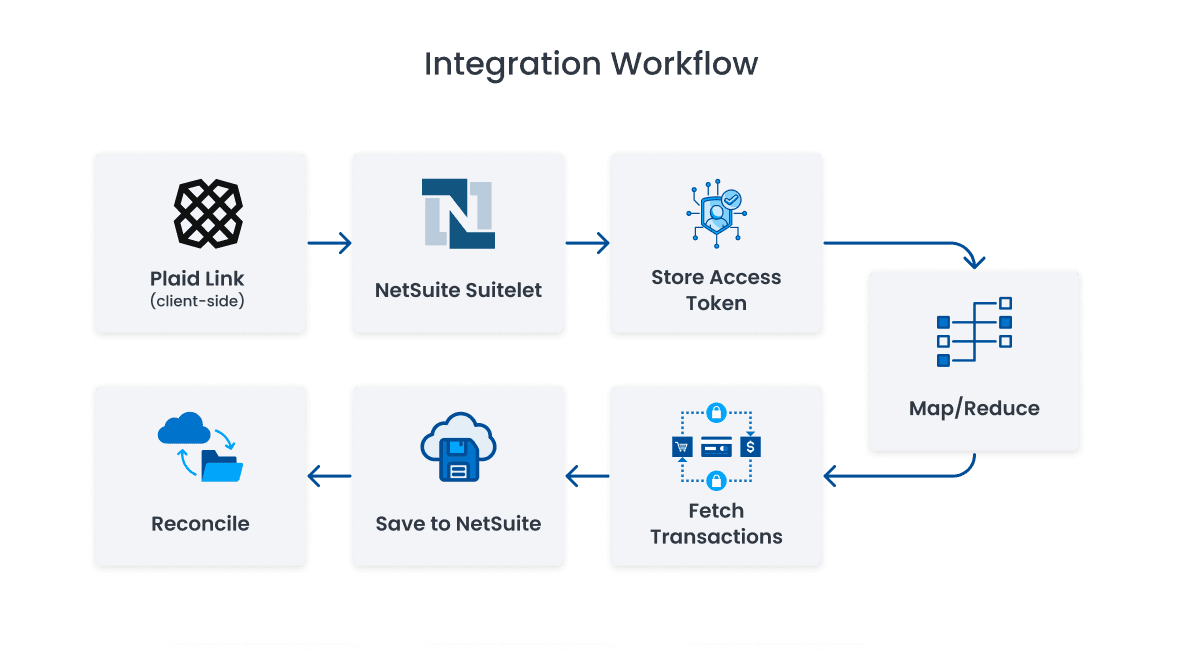
Our Step-by-Step Process

User Connects Bank via Plaid Link
Finance users securely connect their bank accounts through Plaid's client interface.

Access Token Stored in NetSuite
The access token is securely saved in a custom record inside NetSuite.

Automated Transaction Sync
Scheduled Map/Reduce scripts fetch and save bank transactions into NetSuite.
Reconciliation & Insights
Use NetSuite dashboards and saved searches to handle reconciliation, unmatched transactions, and cash reports.
- No more Node.js, Java, or .NET servers are needed
- Built with SuiteScript 2.1
- Easy maintenance, speedy deployment, and safe performance
100% NetSuite Native – No Middleware Required
NetSuite Plaid Integration is entirely native to NetSuite, unlike other connectors.
Benefits of Using NetSuite Plaid Integration
Automated Bank Feeds
No more manual uploads—Plaid automatically pulls transactions into NetSuite.
Real-time Cash Visibility
Finance teams gain immediate access to cash flow and bank balances.
Faster Reconciliation
Match transactions more quickly and reduce month-end close time by 80%.
Increased Accuracy
Tokenized syncing and process-driven automation reduce mistakes and boost consistency.
Multi Bank & Currency Support
Works flawlessly across multiple departments and systems.
Built for NetSuite
Operates entirely within your NetSuite account without external platforms or dependencies.

Faster Reconciliation
Built for NetSuite
- Finance teams that use NetSuite and are weary of CSV uploads
- Companies looking to automate their cash flow visibility
- SaaS, eCommerce, and service-based companies that use multiple bank accounts
- Any organization requiring multi-bank, multi-currency or multi-subsidiary financial consolidation
Who Should Use NetSuite Plaid Integration?
This solution is ideal for:

Let's Talk About NetSuite Plaid Integration
Are you interested in integrating NetSuite Plaid for your business? Here’s what we offer:
Contact us now to schedule a free demo and start automating your bank feeds and reconciliation.
- ✓1-2 weeks for full deployment
- ✓Pre-build SuiteApp/Bundles for quick deployment
- ✓End-to-End training and creating a Dashboard
Frequently Asked Questions
Which banks are available with NetSuite Plaid Integration?
Plaid provides software that enables applications to connect and access this financial data; it supports more than 12,000 banks across the United States, Canada, U.K. and Europe, which include most of the major banks, along with credit unions and digital wallets.
Is NetSuite Plaid Integration safe?
Yes. Plaid secure API powers it, and all tokens reside within the NetSuite platform using custom records. OAuth and TBA (Token-Based Authentication)
Is there external middleware that must be used with this integration?
No, NetSuite Plaid Integration is 100% native to NetSuite – No Node. Js, Java, or .NET is required.
How long does it take to do NetSuite Plaid Integration?
With setup, testing, and training, most of our deployments only take 1 week – 2 weeks.